
A Magento 2 store with 1M products and 10M CMS pages was suffering from constant 504 Gateway Timeout errors under crawler traffic.

Technology Stack:
- Magento 2.4.4
- MariaDB
- Redis
- Varnish
- OpenSearch
Project Size:
- ~1,000,000 products
- ~3,000 categories
- ~10,000,000 CMS pages
Challenges:
- 504 Gateway Timeout errors under search engine crawler traffic
- High load on MariaDB
- Unstable Full Page Cache (FPC) hit ratio
Year:
- 2022
Let's go!
First, a quick disclaimer: all of this happened back in 2022. At the time, I wasn't planning to write a blog, so the original Grafana dashboards and most of the metrics are long gone. However, some notes survived in old tickets, which made it possible to reconstruct the key numbers and decisions.
Stores with catalogs of around 1,000,000 products are already challenging on their own, especially when running on Magento 2. Add roughly 3,000 categories and more than 10,000,000 CMS pages, and it's easy to imagine what happens during traffic peaks and aggressive crawler activity.
At the start, the infrastructure looked exactly like most optimization guides would recommend: Magento 2, Redis, Varnish, and OpenSearch. All major components were configured according to Adobe Commerce / Magento best practices.
However, once the site started receiving heavy crawling traffic from user agents such as Googlebot/2.1, DuckDuckBot/1.0, Mozilla/5.0 (bingbot), along with countless lesser-known crawlers, things quickly got out of hand. Add regular customer traffic on top of that, especially during promotions and seasonal peaks, and the situation escalated rapidly.
The result was predictable: 504 Gateway Timeout errors, a heavily loaded database, and MariaDB once again trying its best to survive under the pressure.
To estimate the Full Page Cache size, I started with a rough theoretical maximum. The median HTML page size on the project was approximately 100 KB.
Let's do the math:
- ~1,000,000 products
- ~3,000 categories
- ~10,000,000 CMS pages
Total: ~11,003,000 pages
11,003,000 × 100 KB = 1,049 GB ≈ 1 TB
Of course, this is only a theoretical maximum. In reality, the entire dataset will never be present in the cache at the same time. Some pages expire because of TTL, some get evicted, and some are simply never requested.
Still, these were the numbers I used as a starting point when redesigning the caching architecture and choosing an FPC strategy.
Redis
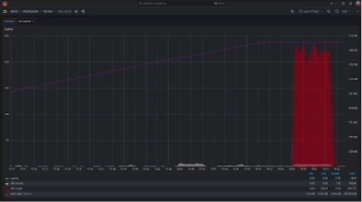
The next question is obvious: how much money would it cost to store that amount of data in Redis and RAM in general?
Even if we ignore the theoretical maximum of 1 TB of Full Page Cache data (which we'll significantly reduce and continuously monitor), there is still an obvious problem: Redis is not used exclusively for FPC. It also has to store user sessions, Magento system cache, configuration, layout, block_html, and various other cache types.
Because of that, scaling the infrastructure by continuously adding more RAM did not look particularly cost-effective, especially from a technical perspective.
The Redis metrics in Grafana only confirmed this assumption.
Obviously, most businesses running Magento stores are not prepared to allocate around 1 TB of RAM (or even 100 GB) solely for Full Page Cache storage.
As a result, I decided to use Redis only for Magento system cache and user sessions, while choosing a different storage mechanism for Full Page Cache.
We Don't Keep FPC in Redis
In the end, I split responsibilities between different storage layers.
For Magento system cache, I used Redis (Cm_Cache_Backend_Redis), while page_cache was moved to the file backend (Magento\Framework\Cache\Backend\File).
Later on, Full Page Cache would be delegated entirely to Varnish. However, at this stage, the primary goal was to remove FPC from Redis and reduce the amount of RAM required for the infrastructure.
'cache' => [
    'frontend' => [
        'default' => [
            'backend' => 'Cm_Cache_Backend_Redis',
            'backend_options' => [
                'server' => '127.0.0.1',
                'port' => '6379',
                'database' => '0',
            ],
        ],
        'page_cache' => [
            'backend' => 'Magento\Framework\Cache\Backend\File',
        ],
    ],
],
'session' => [
    'save' => 'redis',
    'redis' => [
        'host' => 'redis.host',
        'port' => '6379',
        'timeout' => '2.5',
        'persistent_identifier' => '',
        'database' => '2',

        'compression_threshold' => '4096',
        'compression_library' => 'gzip',

        'log_level' => '1',

        'max_concurrency' => '10',

        'break_after_frontend' => '5',
        'break_after_adminhtml' => '30',

        'first_lifetime' => '600',
        'bot_first_lifetime' => '60',
        'bot_lifetime' => '7200',

        'disable_locking' => '0',

        'min_lifetime' => '60',
        'max_lifetime' => '2592000'
    ]
]
The resulting data distribution looked roughly like this:
- ~100 GB — Full Page Cache stored on the filesystem
- ~2–3 GB — Magento system cache (config, layout, block_html, collections, db_ddl, eav, and other cache types) stored in Redis
- ~1–2 GB — user sessions stored in Redis
This approach allowed expensive RAM to be used only where it delivered the highest value.
Instead of keeping hundreds of gigabytes of HTML cache in memory, I moved it to a much cheaper filesystem-based storage layer. As a result, the infrastructure was no longer constrained by the amount of available physical memory.
Varnish
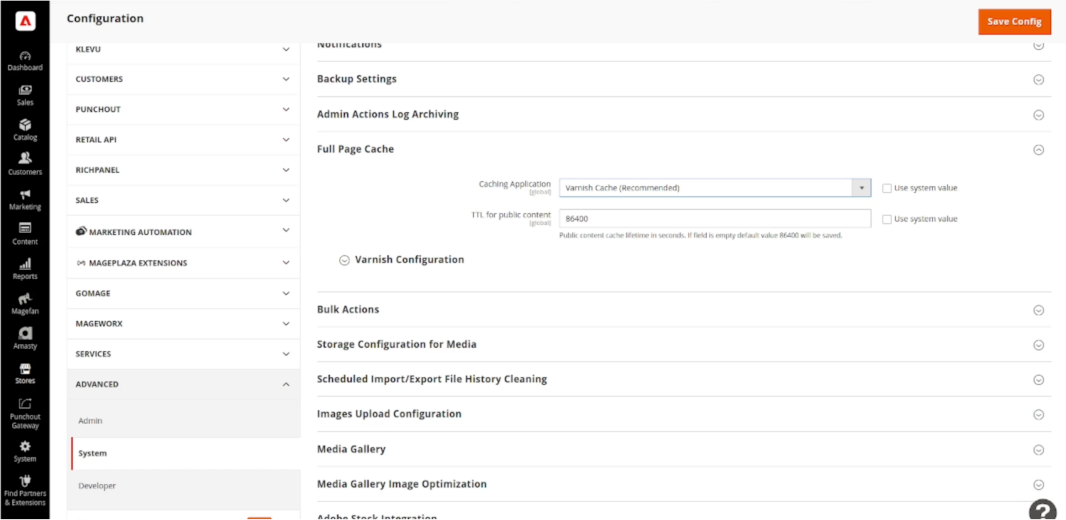
The next step was to delegate Full Page Cache entirely to Varnish.
In Magento, it can be configured through:
Stores » Configuration » Advanced » System » Full Page Cache
where you need to select:
Caching Application = Varnish Cache
After that, Magento is no longer treated as the primary component responsible for serving cached pages. Its role is reduced to generating content and managing cache invalidation, while FPC storage and delivery are delegated to Varnish.
At this point, Varnish becomes the key player responsible for handling the majority of incoming traffic.
Varnish: RAM or Memory Mapped File?
By default, Varnish stores cached objects in memory using the malloc storage backend. For most projects, this is a perfectly reasonable choice, just like Redis. However, in our case it was already clear that keeping hundreds of gigabytes of Full Page Cache in RAM was not economically viable.
A quick look at the Redis metrics shown earlier is enough to understand why continuously adding more memory was not a sustainable approach.
At the same time, it is important to consider the latency characteristics of different storage options:
| Storage | Typical Latency |
|---|---|
| Varnish (malloc) | ~0.1–1 µs |
| Varnish (file) + object in Linux Page Cache | ~1–10 µs |
| Varnish (file) + read from NVMe | ~50–200 µs |
| Magento File Cache | ~100–1000+ µs |
| Page generation via PHP | 10–500+ ms |
Even in the worst-case scenario, reading an object from an NVMe drive remains several orders of magnitude faster than generating a page through PHP and executing the subsequent database queries.
For that reason, instead of keeping Full Page Cache in RAM, I decided to use Varnish file storage, backed by the Memory Mapped Files mechanism.
To run Varnish in this mode, the following configuration can be used:
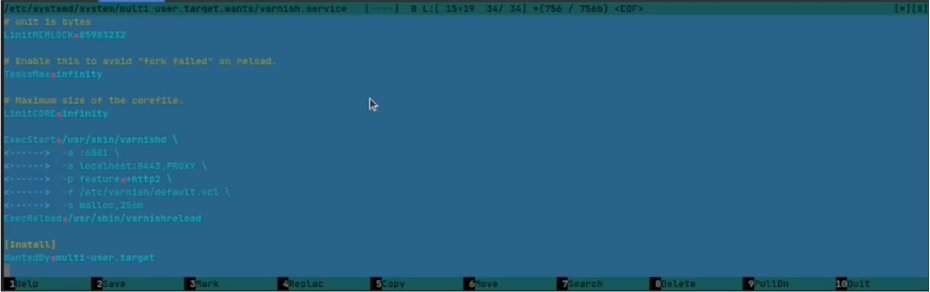
ExecStart=/usr/sbin/varnishd \
    -a :80 \
    -f /etc/varnish/default.vcl \
    -s file,/var/lib/varnish/cache.bin,100G
For local Docker-based experiments, the configuration may look like this.
For the varnish:6.6.1 image, for example, the startup command would be:
CMD ["varnishd", "-F", "-f", "/etc/varnish/default.vcl", "-s", "file,/var/lib/varnish/cache.bin,100G"]
Why 100 GB?
Because the theoretical 1 TB dataset will never reside in the cache at the same time. Some pages expire due to TTL, some are never requested by users or search engine crawlers, and others are naturally evicted over time.
When designing a caching strategy, it makes more sense to focus on the actual working set rather than the theoretical maximum. What matters is the subset of data that actively participates in serving real traffic.
As a result, the architecture looks like this:
Varnish
    ↓
Linux Page Cache (RAM)
    ↓
HDD / SSD / NVMe
In this configuration, the operating system is responsible for deciding which objects should remain in memory and which can be evicted to disk.
This allows RAM to be utilized much more efficiently, without having to reserve hundreds of gigabytes of memory exclusively for Full Page Cache.
Verification

After the configuration is in place, the next step is to verify that pages are actually being served by Varnish.
To do that, inspect the response headers:
X-Varnish: XXXXXX XXXXX
X-Magento-Cache-Debug: HIT
The X-Varnish header should be present (if enabled in VCL), and X-Magento-Cache-Debug should report HIT.
For a quick performance comparison, I used Apache Benchmark:
ab -n 100 https://xxx.xxx.xxx.xxx/
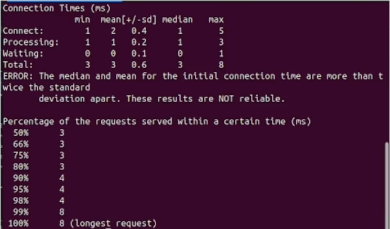
In my case, once the cache was warmed up, the average response time dropped to roughly 3 ms per request.
For comparison, I ran the same test against Magento's built-in Full Page Cache.
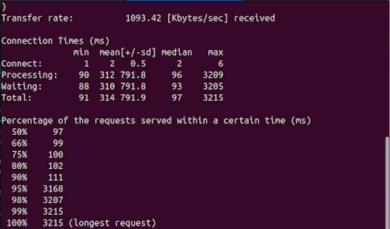
Using the same 100 requests, the average response time was around 97 ms, compared to just 3 ms with Varnish.
Of course, the exact numbers depend on the infrastructure, server configuration, and cache state. Still, even this simple benchmark clearly demonstrates the difference between serving a page directly from Varnish and having the request processed by Magento.
More importantly, however, the real benefit is not the difference between 97 ms and 3 ms. Every request served by Varnish is a request that never reaches PHP-FPM or MariaDB. That is what makes it possible to handle large volumes of crawler traffic without running into 504 errors.
ESI (Edge Side Includes) and Full-Stack development
After configuring Varnish, it may seem like the problem is solved. In practice, however, that is not always the case.
The reason is that the Magento + Varnish stack relies heavily on ESI (Edge Side Includes) for dynamic content blocks. If a page contains non-cacheable elements, Varnish will still need to make requests to PHP in order to generate them.
This is where the most challenging part of the work begins.
To achieve the highest possible Full Page Cache hit ratio, I had to systematically move blocks into the following mode:
cacheable="true"It is important to understand that in Magento, even a single block marked with cacheable="false" can prevent the entire page from being cached.
This means the layout must be analyzed carefully, with the goal of maximizing the number of blocks that can safely be marked as cacheable="true".
However, this introduces another challenge.
You cannot simply replace cacheable="false" with cacheable="true" and consider the problem solved.
Most of these blocks deal with user-specific data, including:
- shopping cart contents
- CSRF protection tokens
- customer information
- personalized pricing
- special offers
- authentication data
- various user-specific states
- checkout-related data
If such content accidentally ends up in the Full Page Cache, the consequences can be painful — ranging from displaying another customer's data to leaking sensitive information.
Therefore, before a block can be marked as cacheable, it must be redesigned in a way that removes any dependency on user-specific context.
In essence, this means moving dynamic functionality to the client side.
For example:
- user-specific blocks can be loaded via AJAX/XHR. More specifically, customer data can be retrieved using Magento's built-in
Magento_Customer/js/customer-datamechanism; - the
form_keyused for CSRF protection can be fetched through a separate AJAX request or via the Fetch API; - UI elements that depend on the user's state can be assembled after the page has loaded using JavaScript, rendered with Knockout.js, or even implemented using React or Vue.js.
As a result, the page HTML becomes completely static and can be safely stored in the Full Page Cache.
How far you should go with this kind of refactoring depends entirely on business requirements and how the business evaluates ROI.
For some projects, caching only CMS pages is sufficient. In others, it makes sense to fully cache category pages and product detail pages. In the most aggressive optimization scenarios, even the checkout process may be refactored for caching purposes. However, such changes require significantly more effort and careful consideration, and in some cases, sticking to the YAGNI principle may be the more sensible choice.
I would also like to mention an interesting Magento 2.4.4 quirk that I stumbled upon during this project.
At the time, the cacheable="false" attribute appeared to be evaluated against the complete set of layout files rather than the final merged layout output. At least, that was the behavior I observed in Magento 2.4.4.
It is entirely possible that Adobe has addressed this in later releases. However, if you plan to implement similar optimizations, it is worth keeping in mind that you may end up needing a custom plugin to work around this behavior.
As a final verification step, it is worth monitoring the following response header: X-Magento-Cache-Debug
For warmed-up pages, you should expect to see X-Magento-Cache-Debug: HIT
A MISS is perfectly normal on the first request after a cache flush or once the TTL has expired.
Cloudflare, CloudFront, and Browser Cache
Once I had achieved a stable Full Page Cache setup with Varnish, the next optimization layer became obvious.
If a page is being served reliably from FPC, it makes sense to allow it to be cached even closer to the end user:
- Cloudflare
- Amazon CloudFront
- corporate proxy servers
- browser caches
To make this work, the Cache-Control and Pragma headers must be configured correctly.
However, there is one important caveat.
The default Varnish configuration commonly used with Magento often removes these headers:
sub vcl_backend_response {
    unset beresp.http.Cache-Control;
    unset beresp.http.Pragma;
}

sub vcl_deliver {
    unset resp.http.Cache-Control;
    unset resp.http.Pragma;
}
If your caching strategy relies on managing TTL values directly from Magento, these lines should be removed.
In that case, Magento will generate the appropriate headers itself, allowing Cloudflare, CloudFront, and browser caches to make use of them.
This effectively creates a multi-layer caching architecture:
Browser Cache
    ↓
Cloudflare / CloudFront
    ↓
Varnish
    ↓
Magento
The higher the cache hit ratio at the upper layers of this chain, the fewer requests reach PHP-FPM, the database, and the content-generation infrastructure as a whole.
Results
On projects of this scale, optimizing PHP execution speed is no longer the primary concern. The real challenge is reducing the number of requests that reach PHP at all.
As a result, the load across the entire infrastructure was significantly reduced.
Before these changes were introduced, MariaDB would regularly hit CPU and memory limits. During periods of intensive search engine crawling, advertising campaigns, and seasonal traffic spikes, the site would occasionally respond with 504 Gateway Timeout errors.
After migrating Full Page Cache to Varnish File Storage and addressing issues related to cacheable="false" blocks, the situation changed dramatically.
Pages began consistently returning:
X-Magento-Cache-Debug: HITA large portion of requests for category pages, product pages, and CMS pages no longer reached PHP-FPM.
The majority of traffic was served directly by Cloudflare and Varnish, significantly reducing the load on PHP and MariaDB and virtually eliminating availability issues.
Future Topics
Of course, Magento scalability is a much broader topic than can be covered in a single article.
In this post, we focused on just one aspect of the problem: building an efficient Full Page Cache strategy and reducing infrastructure load.
If this article proves useful and generates interest, future posts could explore other practical topics in greater depth, including:
- parameterized URLs and their impact on search engine indexing;
- crawler traffic management
- robots.txt optimization
- crawl-delay configuration
- dealing with infinite URL combinations
- protecting infrastructure from low-value bot traffic
Because at this scale, it can sometimes be more cost-effective to eliminate 90% of useless traffic than to keep scaling infrastructure to serve it.